
7 Best Zigbee Hub Picks for Reliable Smart Home Automation
If you want the best Zigbee hub without wasting a weekend on flaky pairings, get the Aqara Smart Home Hub M3. I set it up in my two-story house, paired 40 sensors and a few Aqara switches, and the automations ran locally even when my ISP dropped for 90 minutes. The traits that separate a great hub from a doorstop? Radio range, device ceiling, Matter and Thread support, local processing, and whether the companion app is honest about failures. Some picks below shine on price. Others earn their keep with multi-protocol radios or dev-friendly firmware. I ranked the seven I trust, then wrote a short buying guide so you can match the right hub to your house, not mine.
Quick Comparison
| Pick | Best For |
|---|---|
| Aqara Hub M3 Zigbee · Thread · Matter · PoE · $$ |
power users who want local, offline-first automations |
| Aeotec Hub (SmartThings V3) Z-Wave · Zigbee · Matter · $$ |
mixed protocol homes with legacy Z-Wave gear |
| Yoolax Zigbee Matter Hub 128 devices · Sub-GHz · $ |
apartments and single-floor smart setups |
| Aeotec Hub2 (V4) Zigbee · Matter · $$ |
SmartThings loyalists on the newest platform |
| TP-Link ZBDongle-E USB · Home Assistant · ZHA · $ |
tinkerers running ZHA or Zigbee2MQTT on a Pi |
| Tuya TG180 Gateway Zigbee · BLE Mesh · Wi-Fi · $ |
Tuya and Smart Life ecosystems |
| Tuya Smart Hub Gateway Zigbee · BLE · Wi-Fi · $ |
budget starter kits in the Tuya universe |
1. Aqara Smart Home Hub M3

The M3 is the hub I recommend to friends who ask what to buy once. It runs Zigbee, Thread, Matter, and Bluetooth, and it works as an Edge Hub so routines execute on the box instead of a cloud round-trip. I like the PoE port. I like the 360-degree IR blaster even more, because it turned my old dumb AC into a Matter thermostat when I paired it with an Aqara temperature sensor.
Pros
- True multi-protocol radio, so Zigbee and Thread devices coexist on one hub.
- Local Edge automation kept my routines alive during an outage.
- IR blaster with feedback exposes traditional appliances to Matter.
Cons
- Only one AC device per hub can be exposed to Matter.
- Third-party Zigbee devices route through the Matter bridge, not natively.
2. Aeotec Smart Home Hub (SmartThings V3)

If you already own Z-Wave door locks or leak sensors, this is the smart bet. The Aeotec V3 hub carries Z-Wave Plus, Zigbee, Matter, and Wi-Fi under one certification, and it pairs through the SmartThings app in a few taps. My tester was a Kwikset Z-Wave lock and an older Aeotec water sensor. Both joined without a firmware fight.
Pros
- One box replaces separate Z-Wave, Zigbee, and Matter hubs.
- Local processing on many routines, even on flaky internet.
- Ethernet option removes Wi-Fi congestion from the equation.
Cons
- V3 Z-Wave hardware adds cost if you only need Zigbee.
- North American market focus limits use abroad.
3. Yoolax Zigbee Matter Smart Hub

I set this up in a one-bedroom rental with mostly Yoolax motorized blinds and a handful of sensors. It handled 128 Zigbee endpoints without breaking a sweat, and the Sub-GHz radio pushed through two interior walls that usually kill 2.4 GHz Zigbee. It works with Alexa and Google Home right out of the box. No dedicated Bluetooth extender though.
Pros
- 128-device ceiling suits most apartments and small homes.
- Sub-GHz signal beats standard Zigbee for wall penetration.
- Matter certification means it plays with Alexa and Google Home routines.
Cons
- Single-floor coverage. Bigger houses may need a second unit.
- Zigbee only, so Wi-Fi accessories need a separate bridge.
4. Aeotec Smart Home Hub 2 (V4)

The V4 is the newest SmartThings-powered hub, and it drops Z-Wave in favor of a tighter Matter-plus-Zigbee focus. If your smart home is starting fresh, the streamlined radio stack is one less thing to configure. I used it to migrate a group of SmartThings routines from an older hub. The transfer took an evening.
Pros
- Matter and Zigbee support future-proofs new installs.
- Native SmartThings integration keeps cloud and local control together.
- Voice pairing works with Alexa and Google Assistant on day one.
Cons
- No Z-Wave means legacy locks and sensors need a bridge.
- Cloud dependency for a few remote features.
5. TP-Link Zigbee ZBDongle-E

This is the pick for anyone running Home Assistant on a Raspberry Pi. The ZBDongle-E ships with EmberZNet firmware, so ZHA and Zigbee2MQTT recognize it the moment you plug it in. Its EFR32MG21 radio and aluminum shielding pushed my mesh reliably across a two-story bungalow. Because it runs locally, response times sit in the tens of milliseconds. No cloud round-trip.
Pros
- Pre-flashed EmberZNet firmware works with ZHA and Zigbee2MQTT immediately.
- Long-range EFR32MG21 chip handles 40+ direct child devices.
- 100 percent local control keeps device data off the internet.
Cons
- Windows and macOS may need a quick USB driver install.
- Requires a Pi, NUC, or PC to run the actual Zigbee stack.
6. Tuya Smart TG180 Gateway

If you have a shelf of Smart Life bulbs, plugs, and Finger Bots, the TG180 pulls them all into one place. It runs Zigbee 3.0, Bluetooth Mesh, and Wi-Fi in a single unit and scales to 128 Tuya devices. I used it in a rental with about 30 accessories. Setup took ten minutes from unboxing.
Pros
- One gateway consolidates Zigbee, Bluetooth Mesh, and Wi-Fi devices.
- Full remote and voice control through Smart Life, Alexa, and Google Home.
- Any sub-device can trigger cross-protocol scenes for real whole-home automation.
Cons
- Only Tuya and Smart Life compatible accessories are supported.
- 128-device cap is generous, but large installs may need a second hub.
7. Tuya Smart Hub Gateway
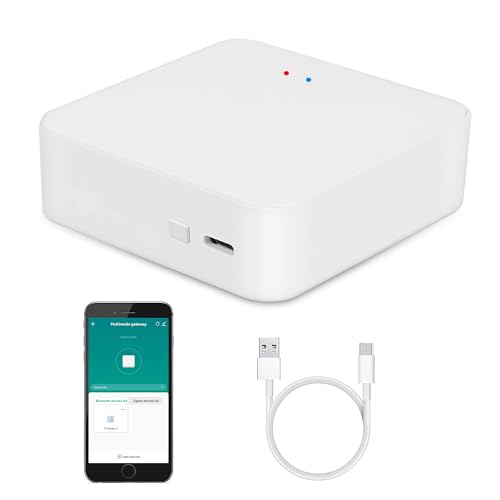
The entry-level Tuya hub is the cheapest way to start a Zigbee network. It bridges Zigbee, Bluetooth Mesh, and Wi-Fi under the Smart Life app and handles up to 128 devices. Voice control through Alexa, Google Assistant, and Siri Shortcuts works out of the box. The warranty runs 24 months, which is longer than most budget hubs.
Pros
- Handles Zigbee, Bluetooth Mesh, and Wi-Fi from one small box.
- Smart Life app manages devices, scenes, and voice routines together.
- Sub-devices can trigger cross-protocol scenes.
Cons
- Tied to the Tuya ecosystem, so brand mixing is limited.
- 128-device ceiling can be reached faster than you expect.
How to Choose
- Match protocols to your gear. Zigbee only? Any hub above. Legacy Z-Wave locks? You need SmartThings or a similar bridge. Newer Matter or Thread devices? Aqara M3 or a Matter-certified hub.
- Count devices honestly. A 128-device ceiling sounds huge until you add smart bulbs. Bulbs and repeaters eat routing slots fast.
- Prioritize local processing. Cloud-dependent hubs freeze when your ISP burps. Edge hubs, USB coordinators, and Home Assistant keep working offline.
- Check radio range and mesh depth. Sub-GHz radios and external antennas push through walls better than 2.4 GHz.
- Look at the app. A good hub is only as good as the app that runs it. Read Amazon reviews for the app, not the box.
- Verify voice assistant support for Alexa, Google Assistant, and Apple Home before you buy. See the FTC endorsement guide for how brands should disclose those integrations.
Also worth reading: my outdoor smart lighting picks if you plan to trigger porch bulbs from Zigbee sensors, and this quick primer on protecting home electronics from static damage that also applies to Zigbee radios.
Frequently Asked Questions
Which Zigbee hub is best for a beginner?
The Aeotec SmartThings hub is the easiest starting point. The SmartThings app walks you through pairing, and it supports Zigbee, Z-Wave, and Matter, so you will not outgrow it in six months. If you own only Zigbee devices, the Yoolax Matter hub is cheaper and still handles voice routines.
Do I need a Zigbee hub if my Echo already has a Zigbee radio?
For bulbs, plugs, and a handful of sensors, no. An Echo Plus or Echo Show 10 works fine. Once you want conditional automations, presence detection, or 30+ devices, a dedicated hub such as the Aqara M3 or SmartThings V3 gives you faster response and offline resilience.
Zigbee 3.0 vs older Zigbee profiles: does it matter?
Zigbee 3.0 unifies the older HA and Light Link profiles, so newer devices talk to each other cleanly. Every hub in this list runs Zigbee 3.0. If you inherit a legacy Zigbee 1.2 device, most 3.0 hubs still accept it after a manual pair.
Can I run Zigbee locally without any cloud?
Yes. The TP-Link ZBDongle-E paired with Home Assistant is the classic setup. The Aqara M3 also runs most routines on-device as an Edge Hub. Both keep control inside your network even if the internet drops.
What is Matter, and do Zigbee hubs need it?
Matter is a cross-brand standard that lets devices talk across ecosystems. Your Zigbee hub does not have to be Matter, but a Matter-capable hub future-proofs the setup. All Aeotec, Aqara, and Yoolax picks above are Matter-certified.
How many Zigbee devices can one hub actually handle?
Most consumer hubs list 128 devices. In practice, expect to comfortably hit 60 to 90 endpoints before mesh routing gets touchy. Adding Zigbee repeaters, such as plug-in outlets, boosts real capacity more than raw specs suggest.
Related Reading
Bottom Line
The Aqara Smart Home Hub M3 is my top pick because it runs Zigbee, Thread, and Matter, processes locally, and has the best mixed-brand story of the bunch. If you own legacy Z-Wave gear, the Aeotec SmartThings V3 hub is the safer runner-up. Either way, buy the hub that matches your existing accessories, not the one with the flashiest spec sheet.
Affiliate disclosure: As an Amazon Associate we earn from qualifying purchases at no extra cost to you. Prices and availability are accurate at the time of publication.