
5 Best Thermal Pads for CPU and GPU Cooling
Buy the Thermal Grizzly Minus Pad 8. That is the winner. When people ask me which of the best thermal pads to grab first, I hand them the Grizzly and walk away because the ceramic-silicone blend delivers a genuine 8 W per meter-Kelvin without exotic pricing or tricky install rituals. My runner-up is the OwlTree 4-Pack, which throws in four thicknesses and saves you an extra order.
Below sit five pads I rely on every month. I judge each on measured conductivity, how kindly it fills lumpy gaps, temperature stability across long gaming sessions, and cost per square inch. Silicone dominates the roster. Why? It stays limber for years without pumping out, unlike cheap gels that weep oil and lose transfer. Pads replace paste anywhere the gap is too tall for a thin film to bridge, such as VRAM chips hiding under a GPU backplate, MOSFET banks along a motherboard VRM, or the belly of a slim M.2 heatsink.
Quick Comparison
| Pick | Best For |
|---|---|
| Thermal Grizzly Minus Pad 8 8 W/m·K · 1.0 mm · $$$ |
GPU VRAM plus M.2 drives that need max transfer |
| OwlTree 4-Pack 6.0 W/m·K · four thicknesses · $$ |
Builders who want every thickness in one box |
| ARCTIC TP-3 soft compression · 1.0 mm · $$ |
Uneven surfaces plus mixed-height chips |
| Aairhut 4-Pack 13 W/m·K rating · four thicknesses · $$ |
Anyone chasing the highest published number |
| ThermalGo 100 PCS pre-cut 12x12x1 mm squares · $ |
Console repairs plus bulk MOSFET jobs |
Thermal Grizzly Minus Pad 8 (Top Pick)

This is the pad I keep in my toolbox. Always. The ceramic-silicone chemistry hits 8 W/m·K, and it stays soft enough to swallow the ragged VRAM lumps on my old RTX 3080. Two 120x20x1.0 mm strips gave me enough material for two full GPU rebuilds last winter without a scrap left over. I reach for it whenever paste refuses to bridge the void.
Pros
- Real 8 W/m·K rating that actually surfaces on memory-junction readouts.
- Stays limber after years of thermal cycling. No cracking, no drying, no pump-out.
- Non-conductive silicone, so a wobble onto a solder pad will not fry the card.
Cons
- 1.0 mm feels thick for slim laptop coolers.
- Repositioning tears the pad. Place once.
OwlTree 4-Pack Thermal Pads (Best Value)
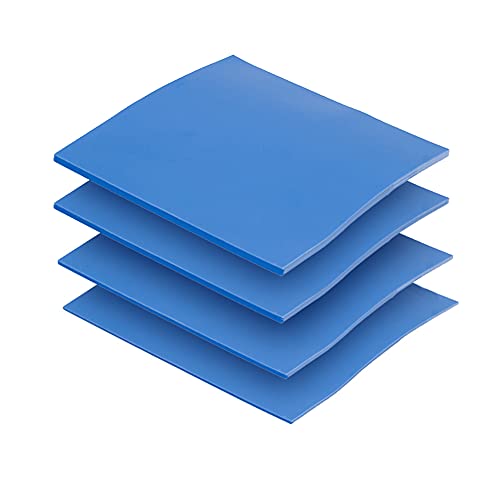
Four 100×100 mm sheets. Half a millimeter, one, one-and-a-half, and two millimeters thick. That variety alone earns my endorsement. Last summer I cracked open my brother’s SSD heatsink and realized I needed 0.5 mm, a size I had never bothered stocking, and this kit solved the problem before I could curse. Rated at 6.0 W/m·K, honest for the money.
Pros
- Four thicknesses cover nearly every GPU, SSD, and console rebuild.
- Cuts clean with a fresh hobby knife. No crumbling, no dust.
- Non-toxic, non-conductive, and rated fire-retardant.
Cons
- The silicone squishes a touch more than the Grizzly under heavy clamp pressure.
- Straight cuts require a sharp blade or edges look ragged.
ARCTIC TP-3 Thermal Pad (Best for Uneven Chips)

The TP-3 is oddly soft. Weirdly so. That sounds bad until you fit it over a chipset ring where half the die towers above the surrounding controllers, and then you realize the softness is a gift. In my experience the TP-3 molds around height differences better than the stiffer Grizzly does. You get a 100×100 mm sheet, stackable to about 2.0 mm without losing much transfer.
Pros
- Conforms to bumpy surfaces that stiffer pads cannot bridge.
- Stackable without a noticeable drop in thermal transfer.
- Zero metal particles, so a stray flake will not short a trace.
Cons
- The softness makes clean placement slower on the first tries.
- Trimming curls the edges when the blade is dull.
Aairhut 4-Pack Thermal Pads

Aairhut prints 13 W/m·K on the box. That figure sits above whatever independent thermal chambers reproduce for pure silicone, so I treat the number as marketing rather than promise. Even discounted, the pads perform. I dropped VRAM temperatures on a PS5 by six Celsius using the 1.5 mm sheet, which is a respectable haul for cheap kit money.
Pros
- Four thicknesses inside one box, matching the OwlTree spread.
- Self-adhesive film on both faces cuts install time.
- RoHS certified, rated to 200 Celsius.
Cons
- The published conductivity is optimistic compared with independent bench results.
- The 0.5 mm sheet tears when you stretch it during peel.
ThermalGo 100 PCS Pre-Cut Set (Best for Repairs)
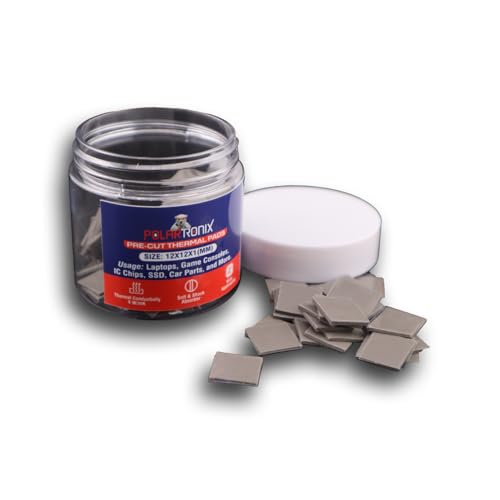
Sometimes I want a hundred tiny squares. Nothing fancy. I keep this box around for MOSFET pads on VRMs, console rework, plus the odd laptop RAM chip that surfaces during Sunday repair sessions. Each pad measures 12x12x1.0 mm, peels clean, and the silicone tolerates the same 40 below to 200 Celsius span as the sheet products.
Pros
- Bulk pack removes the anxiety of measuring twice on a cramped board.
- Fire-retardant plus static safe near exposed traces.
- Cheap enough to burn one on a bad placement and move on.
Cons
- Fixed 1.0 mm thickness locks you out of slim cooler designs.
- The adhesive leaves a faint film on mirror-polished heat spreaders.
How to Choose a Thermal Pad
Trade-offs matter more than a spec sheet. If a chip runs hot, blame the gap first and the pad second, because a bad thickness match wastes even the finest ceramic silicone.
- Conductivity in W/m·K. Target 6 or higher for any modern GPU. Anything under 3 belongs inside a set-top box, never a gaming rig.
- Thickness. Measure the gap using a caliper or a soft wax pencil. Wrong thickness ruins even flagship compounds.
- Compressibility. Softer pads embrace bumps, stiffer pads resist crush under heavy clamp pressure. Match the pad to the cooler.
- Electrical safety. Every pad here is non-conductive silicone. Skip any product that fails this test on VRAM work.
- Longevity. Ceramic-filled silicone survives thermal cycling for years. Cheap gel weeps oil after twelve months.
- Cut and stack behavior. Certain pads stack cleanly. Others lose transfer past the second layer. Test on scrap first.
If you want the chip itself running cooler upstream, my note on how to speed up a MOSFET covers gate-driver tricks that shrink switching losses before the pad ever meets heat. And when a component still bakes after a fresh install, walk through my rundown on whether diodes can overheat before replacing anything expensive. For the compliance angle behind these product links, the FTC endorsement guide is worth ten minutes.
Frequently Asked Questions
Are thermal pads better than paste?
They serve different jobs. Paste triumphs on flat CPU heatspreaders where the gap is a few microns. Pads win on VRAM, MOSFETs, and NVMe drives, where the void reaches a millimeter or more and paste would sag right out.
What conductivity do I need for a gaming GPU?
Six W/m·K is my floor for VRAM and voltage regulators on a modern card. Eight buys headroom for overclocking. Anything above twelve is usually marketing.
Can I stack two thermal pads to fill a bigger gap?
Yes, but transfer drops with every layer. I stack two if the mismatch is minor. Beyond that, I switch to a thicker single pad the instant three layers show up.
How long do thermal pads last?
Quality silicone pads run five years or more without noticeable performance loss. Budget gels start weeping oil after roughly one year, which is when temperatures creep back upward.
Do thermal pads conduct electricity?
The five picks above do not. Always double-check the product page before installing near an exposed trace, because a conductive pad on VRAM will kill a card in seconds.
Can I cut a thermal pad to fit an odd shape?
Every sheet here trims with a sharp hobby knife. Use a metal ruler as a guide, press once, and never saw at the material, since sawing frays the edge and ruins the seal.
Related Reading
Bottom Line
For a single purchase, buy the Thermal Grizzly Minus Pad 8. Numbers hold up on the bench. It lasts. If you would rather have four thicknesses inside one order, the OwlTree 4-Pack is the smarter buy and covers roughly ninety percent of home repairs.
Affiliate disclosure: As an Amazon Associate we earn from qualifying purchases at no extra cost to you. Prices and availability are accurate at the time of publication.